Refine tri-meshes
With the Refine Tri-Meshes form (model > Fault Stability > Tools) you can refine your fault tri-meshes based on a user-defined triangle size and curvature. For faults that are used in the Fault Stability workflow, a suitable triangle resolution is important because fault stability calculations are directly impacted by the shape of the fault surface and the orientation and size of the individual triangles. Triangles need to be fine enough for the final result to be detailed enough and they need to be evenly spread over the fault surfaces. When your faults are output from a JewelSuite fault model, structural model or 3D mesh structural model, most probably the resolution is already suitable for the Discrete Analysis workflow.
To refine tri-meshes
- Open the Refine Tri-Meshes form and from the Model drop-down list select the Fault Stability Model that contains the fault(s) that you want to refine.
- In the Faults table, select the faults you want to refine.
- For Triangle size, enter the average triangle size of the triangles after refinement.
- To restrict refinement to specific curved areas, specify a value for Minimal curvature. Only areas with a curvature ≥ minimal curvature value are refined.
- Click Apply or OK to refine the tri-mesh(es). When the refinement process is completed, you can find details on the results of the refinement in the Output Information pane.
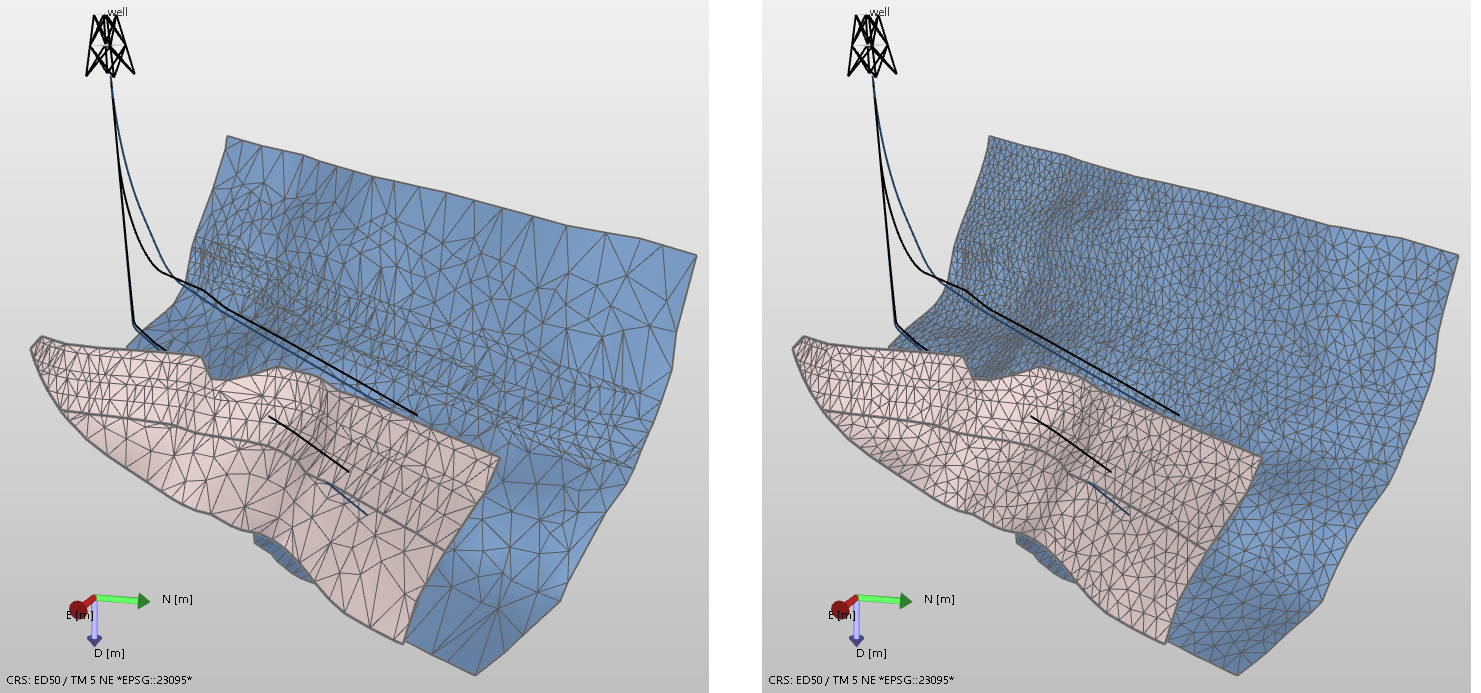
Use the fault context menu option Display Settings > Render Mode > Solid and Mesh to display the triangles. Left image: two faults before refinement, right image: the same faults after refinement. A triangle size of 15 m. was used. click to enlarge